Easy Metronome
- 4.9
- Rating
- 1.00M
- Installs
- Free
- Price

 Analysis by App-foxy
I usually notice a metronome most when it gets in the way of practice. A crowded interface, a distracting advertisement, or a tempo control that takes too much effort can turn a simple timing exercise into a small technical chore. Easy Metronome takes a more focused approach: it is a music and audio app from Digipom built around keeping a steady pulse for instrument practice and live playing. After spending time with it, I found its main appeal is not entertainment but concentration. It gives a musician one job to think about: choosing a tempo and staying with it.
Easy Metronome is free to install, suitable for Everyone, and currently sits at version 1.3.7. It has reached more than a million installs, with an average rating of 4.9 from around 33 thousand ratings. Those figures suggest that the app has found a clear audience among people who want a straightforward timing tool rather than a broad music-learning platform. In-app purchases range from $1.49 to $1.99 per item, so the basic entry point is easy, while some extras may require payment.
What the app feels like in everyday practice
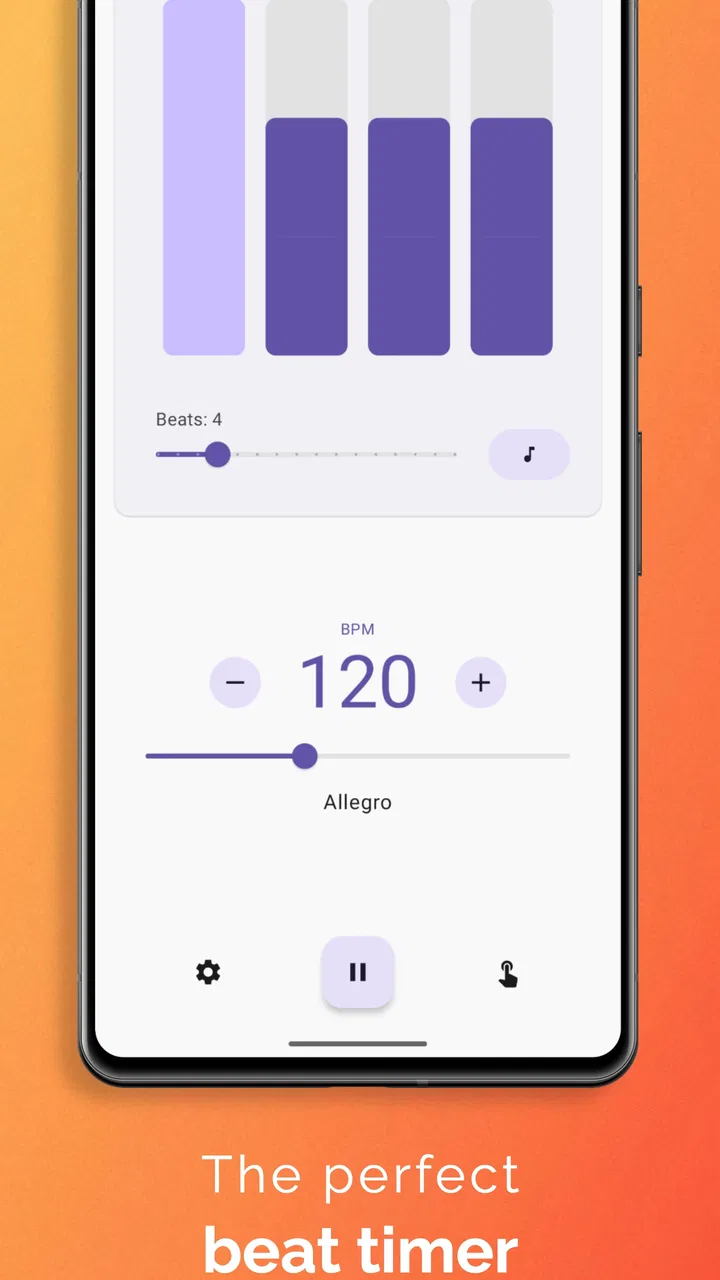
My first impression is that Easy Metronome is designed for quick access. A metronome is rarely something I want to explore for several minutes before using. I normally open one while an instrument is already in my hands, set a pulse, and begin. That makes clarity more important than visual decoration, and this app’s identity is strongest when treated as a practical utility rather than a music discovery experience.
You May Also Like

 Blood Strike: 2.5 Anniversary
Blood Strike’s Loadouts Turn Every Drop Into a Tactical Gamble
A close look at Blood Strike’s custom loadouts: how fast access to signature weapons reshapes its battle royale rhythm, rewards preparation, and narrows the gap between fights.

 Pandora - Music & Podcasts
Pandora’s Music Is Easy to Start, but Harder to Recover
Pandora’s strength is its low-effort path from a seed to a station. Its weak spot is how much confidence it asks you to place in connection, setup, and quiet recovery.

 8 Ball Pool
 Is Built on Rivalries, Rematches, and Routine
A close look at the rivalries, rematches, shared routines, and unanswered safety questions that turn a quick pool match into a persistent mobile community.

 Samsung Music
’s Quiet Strength Is Playing What You Already Own
Its reach comes less from spectacle than from dependable access to a personal library. That simplicity is both the app’s strongest retention engine and its ceiling.

 AccuWeather: Weather Radar
AccuWeather Review: A Quick, Clear Forecast for Everyday Decisions
For everyday plans, the best forecast is the one you can understand quickly. AccuWeather makes rain timing, radar, and local conditions easy to act on, with a few trade-offs.

 Hill Climb Racing
Why Hill Climb Racing Still Turns Crashes Into One More Run
A tiny car, a bumpy hill and one more upgrade: Hill Climb Racing keeps resurfacing because its simple chaos makes every near-miss feel personal.
More From Our News Desk



The useful question is not whether a metronome can produce clicks. Almost every app in this category can do that. The better question is whether the timing tool stays out of your way when you are trying to fix a difficult passage, warm up, or hold a beat during a rehearsal. Easy Metronome makes sense for those moments because its purpose is narrow and understandable. I do not need to move through lessons, browse songs, or configure a complete practice plan before hearing a pulse.
That simplicity also affects who should choose it. A beginner learning scales can use it without needing to understand complicated rhythm software. A guitarist working through a riff can use a slower pulse and gradually build consistency. A drummer or percussionist may appreciate having a portable reference when a full hardware metronome is not nearby. For a singer, it can help with entrances and phrasing, although the usefulness depends on how comfortable the singer is practicing against a click.
It is less suitable if you want a complete musical workspace. Someone looking for recording, notation, automatic tempo detection, song libraries, or detailed progress tracking should look toward a more specialized app. Easy Metronome is valuable precisely because it does not try to become all of those things. That focus is a strength for short sessions, but it can feel limited if your practice routine depends on several connected tools.
Why a phone metronome can be more convenient than hardware
A physical metronome still has advantages. It is independent of battery-saving settings, notifications, incoming calls, and the general distractions of a phone. It also feels dependable in a rehearsal room because it has one obvious purpose. Easy Metronome cannot remove those phone-related interruptions. If I am using it beside sheet music, I need to position the phone so I can see the controls without repeatedly touching the instrument or accidentally switching away.
The phone format wins in other situations. I can keep one timing tool with the rest of my music apps instead of carrying another device. It is especially practical before a lesson, during a brief warm-up, or when I want to test whether a passage is stable at a slower speed. That convenience is more meaningful than it sounds: the less effort required to begin, the more likely I am to use a metronome instead of practicing by feel alone.
There is also a useful distinction between a metronome used for private practice and one used in a performance environment. In a quiet room, the phone’s speaker may be enough for basic work. In a group setting, the sound may be harder to hear, and the phone may need to be connected to a louder audio setup. That is where the surrounding equipment matters more than the app itself. I would test the volume and placement before relying on it for a live performance.
Connectivity, interruptions, and the moments that matter
The most important connectivity issue is not whether the app is constantly communicating with something else; it is what happens around the app while I am trying to use it. A phone is a connected device, so calls, messages, notifications, Bluetooth changes, and system interruptions can compete with a steady practice session. A metronome is unusually sensitive to this kind of friction because losing focus for even a moment can break the exercise.
For that reason, I treat Easy Metronome as one part of a controlled mobile setup. Before starting, I silence unnecessary alerts, close anything that might pull my attention away, and place the phone where I can reach it without moving my instrument. If I am practicing with headphones or an external speaker, I check the connection before beginning a demanding passage. These steps are not special features of the app, but they make a real difference to how reliable the experience feels.
A realistic example is a short guitar session after work. I may have only fifteen minutes, so I open the app, choose a comfortable pulse, and repeat a difficult chord change. If the phone is receiving notifications throughout the exercise, the problem is not the tempo control; it is the loss of concentration. If the audio route changes unexpectedly, I may continue playing without realizing that the reference has disappeared. The best use of the app comes from preparing the phone first, then leaving it alone.
For live music, I would be more cautious. A connected phone can be useful as a backup timing source, but I would not make it the only timing reference without testing the exact setup. The room, speaker, instrument volume, and interruptions all affect whether the click remains audible and dependable. Easy Metronome can support a performance workflow, but the responsibility for a stable audio environment remains with the musician.
Handling mistakes and recovering without losing the session
One of the less obvious tests for a metronome is recovery. I do not only want to know how it starts; I want to know how quickly I can return to practice after changing the tempo, pausing, or being interrupted. A good routine should not turn a small mistake into a complete restart. With a focused tool like this, the practical advantage is that I can return to the central timing task instead of navigating through unrelated features.
My preferred recovery method is simple. If a passage falls apart, I stop playing rather than chasing the beat, reset to a tempo I can control, and repeat the smallest difficult section. Once the rhythm feels secure, I raise the pace in modest steps. This is more useful than immediately returning to the original speed, because the metronome should expose inconsistency rather than encourage me to hide it.
Phone interruptions require a different kind of recovery. If an alert pulls my attention away, I first confirm that the pulse is still audible and that the app remains in the expected state. I then play a few bars without focusing on the difficult passage, using that time to settle back into the beat. This small reset prevents me from judging the app based on a practice session that was disrupted by the operating system or another application.
There is a trade-off here compared with a dedicated hardware unit. Hardware tends to feel more isolated from mobile distractions, while a phone offers easier access and fewer objects to carry. If your practice environment is noisy, your phone is frequently interrupted, or your performance depends on uninterrupted timing, a physical metronome or a more specialized audio setup may be the better choice. Easy Metronome is most convincing when convenience matters and the user is willing to manage the surrounding phone environment.
Using it carefully when mobile data matters
I also think about data-conscious use whenever an app is used around music equipment. A metronome does not need to become a reason to keep every connected service active during practice. My own approach is to prepare the session before playing: update or configure the app when convenient, avoid unnecessary background activity, and use the phone’s normal system controls to reduce distractions. That keeps the practice period focused and avoids treating a simple timing task like a full online activity.
I would not assume that every useful behavior depends on a network connection, and I would not promise a completely offline experience without checking the exact version and device setup. Instead, I judge the app by the moments that matter: can I open it when I need a pulse, can I keep the phone stable beside my instrument, and can I recover quickly if the mobile environment interrupts me? Those are more practical questions than simply asking whether an app is “online” or “offline.”
People who practice in studios, classrooms, buses, parks, or rehearsal spaces should think about their particular conditions. A weak connection may not be the only concern; battery level, speaker volume, Bluetooth reliability, and notification settings can matter just as much. If I am preparing for a lesson, I prefer to check the app and audio path beforehand rather than discovering a problem when the teacher or band is waiting.
The free price makes trying that workflow easy. I can see whether the interface suits my instrument and whether the phone’s sound is adequate before deciding whether any in-app purchase is worthwhile. The paid items, priced between $1.49 and $1.99 each, should be considered in that practical context: they may be reasonable for someone who uses the app regularly, but a casual musician may not need anything beyond the core experience.
How it compares with common alternatives
The usual alternatives fall into three groups: a physical metronome, a general-purpose metronome app, and a larger music-practice application. A physical unit is usually the strongest option for isolation and predictable operation. A general metronome app may offer a similar basic purpose, so the deciding factor becomes interface comfort and how quickly the user can establish a pulse. A larger practice app may provide more tools, but it can also introduce more screens and setup than someone needs for a five-minute exercise.
Easy Metronome sits closest to the second group, but its appeal is its focused identity. I would choose it over a broad practice suite when I want timing without a lesson plan. I would choose a dedicated hardware device when the phone is likely to distract me or when a rehearsal needs a more independent reference. I would choose a feature-heavy music app when I need rhythm training, recording, notation, or structured progress in the same place.
That comparison also explains why the high average rating is understandable without making the app universally perfect. A focused utility can satisfy users very well when it matches their need exactly. It can disappoint users who expected a complete musician’s toolkit. The right decision depends less on how many functions an app has and more on whether you want a clean timing companion or a broader practice system.
Who will get the most from it
I would recommend Easy Metronome to students who need a dependable starting point for rhythm work, instrumentalists who want a quick practice aid, and performers who need a portable tempo reference after testing their audio setup. It is also a sensible choice for anyone who has tried to practice with an improvised beat from another app and found that the surrounding features became distracting.
It is particularly useful for breaking a habit of practicing too quickly. I can begin below the speed that feels comfortable, concentrate on even attacks, and only increase the pace once the passage is controlled. That is a small workflow change, but it is one of the most valuable ways to use any metronome. The app becomes less about producing sound and more about making my practice honest.
I would hesitate to recommend it as the sole timing solution for a professional stage setup, a loud ensemble, or a musician who needs detailed rhythm analysis. In those cases, dedicated equipment or a deeper music application may offer more confidence. I would also skip it if I know that using my phone beside the instrument will lead to constant checking of unrelated notifications. The convenience of a mobile metronome disappears when the phone becomes the main distraction.
My final view on this portable timing tool
Easy Metronome succeeds because it understands the value of restraint. Digipom has made an app for a specific musical need, and that makes it easy for me to imagine using it before scales, during a difficult passage, or as a temporary timing reference in rehearsal. The free starting point lowers the barrier, the Everyone age rating makes it approachable for a wide range of learners, and its strong reception reflects how well a focused tool can serve its intended audience.
My main reservation is not about the idea of the app but about the phone around it. Connectivity, notifications, audio routing, and battery conditions can shape the experience even when the metronome itself is doing exactly what I need. I would prepare the device, test the sound, and avoid depending on it blindly in a demanding live situation. For ordinary practice, those precautions are easy to manage.
My recommendation is simple: choose Easy Metronome if you want a focused, portable beat and are comfortable managing the distractions of a connected phone. It is not a replacement for every hardware or professional music tool, but it is a practical companion for building steadier timing without turning a short practice session into a complicated technical project.
FAQs for Easy Metronome
01What features does Easy Metronome offer?
Easy Metronome provides a range of features designed to enhance your musical practice sessions. It includes a variety of time signatures, adjustable tempo settings, and a tap tempo feature to match your playing speed. Additionally, it offers visual and audio cues for better rhythm synchronization, making it suitable for musicians of all skill levels.
02Is Easy Metronome user-friendly for beginners?
Yes, Easy Metronome is designed with simplicity in mind, making it ideal for beginners. The intuitive interface allows users to easily navigate through the settings. With clear instructions and straightforward controls, even those new to using metronomes can get started quickly without a steep learning curve.
03Does Easy Metronome require an internet connection to function?
No, Easy Metronome does not require an internet connection to function. It is fully operable offline, allowing users to practice anywhere without worrying about connectivity. This makes it a reliable tool for musicians who may not always have access to Wi-Fi or mobile data.
04Can I customize beats and time signatures in Easy Metronome?
Yes, Easy Metronome allows for extensive customization of beats and time signatures. Users can adjust the number of beats per measure and choose from a wide range of time signatures to suit their practice needs. This flexibility ensures that musicians can tailor the app to fit any piece of music.
05Is Easy Metronome compatible with both Android and iOS devices?
Yes, Easy Metronome is compatible with both Android and iOS platforms. This cross-platform availability ensures that users can enjoy the app’s features on a wide range of devices, whether they are using a smartphone or a tablet, making it a versatile tool for musicians.
Pros
- User-friendly interface for all skill levels.
- Customizable tempo settings enhance flexibility.
- Visual and audio cues for improved timing.
- Lightweight app with quick loading times.
- Free version offers ample features.
Cons
- Lacks advanced features for professionals.
- Occasional ads disrupt practice sessions.
- Limited sound options for metronome beats.
- No integration with music learning apps.
- In-app purchases can be costly.

Easy Metronome
Gallery